> ## Documentation Index
> Fetch the complete documentation index at: https://help.broadstripes.com/llms.txt
> Use this file to discover all available pages before exploring further.
# Project settings overview
## Intro
As the admin of your Broadstripes project, you may find that you have a lot of information you want to keep track of – data imports, custom fields, report formats, and user permissions, just to name a few. Thankfully, Broadstripes provides the tools you need to make your job more simple.
One tool you should know about is the **Project settings page** – a single access point for all of your admin tools.
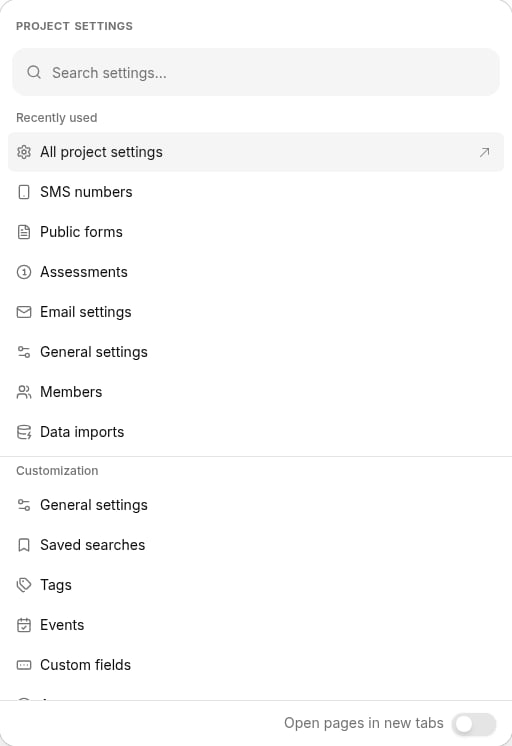
To access your project settings, click the **Project settings** button in the upper-right navigation bar, or press **Cmd+K** (Mac) or **Ctrl+K** (Windows/Linux). A searchable command menu opens listing all settings pages available to you. Type to search by name, or scroll through the grouped list. A **Recently used** section at the top shows the settings pages you visit most often.
A footer toggle lets you set whether settings pages open in a new tab or the current tab by default. You can also control tab behavior for individual items without changing the toggle:
* **Hover** over any row to reveal an arrow button at the right edge. Click it to open just that page in a new tab, leaving the toggle unchanged.
* **Hold Cmd** (Mac) or **Ctrl** (Windows/Linux) while selecting an item to invert the toggle for that one selection: if the toggle is off, the item opens in a new tab; if the toggle is on, it opens in the current tab.
To open the full **Project settings page**, select **All project settings** from the menu.
 When the **Project settings page** opens, you'll see a list of all your project settings in one convenient place. From there, just click a link to view or modify that setting.
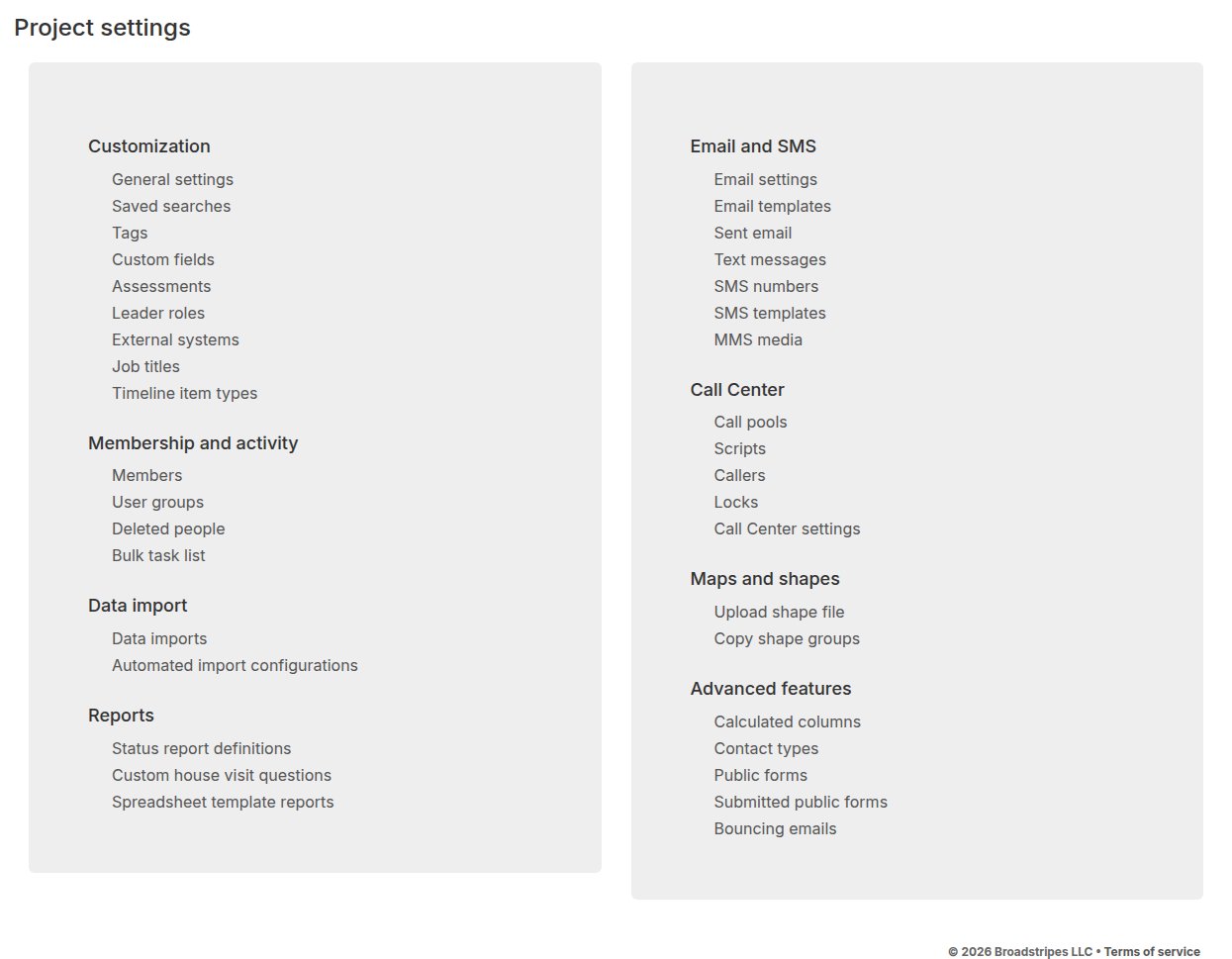 Your **Project settings page** may look slightly different depending on the features you have enabled for your project.
## Project settings
Click any project settings topic below to get an in-depth description:
### Customization
[General settings](/docs/project-settings/general-settings/)\
[Saved searches](/docs/search/save-and-share-searches#manage-all-saved-searches)\
[Tags](/docs/project-settings/lists-custom-fields-events)\
[Custom fields](/docs/project-settings/lists-custom-fields-events/)\
[Events](/docs/project-settings/lists-custom-fields-events/)\
[Assessments/Codes](/docs/project-settings/assessment-settings/)\
[Leader roles](/docs/project-settings/leader-roles/)\
[External systems settings](/docs/project-settings/external-systems-settings/)\
[Job titles settings](/docs/project-settings/job-titles-settings/)\
[Timeline item types](/docs/project-settings/timeline-item-types)
### Membership and activity
[Members settings](/docs/project-settings/members-settings/)\
[User group settings](/docs/project-settings/user-group-settings/)\
Deleted people\
Bulk task list
### Data import
[Data imports](/docs/project-settings/data-imports-settings)\
[Automated import configurations](/api/automated-import-configuration)
### Reports
[Status report definitions](/docs/project-settings/status-report-definitions/)\
[Custom house visit questions](/docs/project-settings/custom-house-visit-questions/)\
[Spreadsheet template reports](/docs/lists-reports/spreadsheet-template-reports)
### Email and SMS
[Email settings](/docs/project-settings/outgoing-email-settings/)\
[Email templates](/docs/communications/creating-email-templates)\
Sent email\
[Text messages](/docs/communications/text-messaging)\
[SMS numbers](/docs/communications/provisioning-a-virtual-sms-number)\
[SMS templates](/docs/communications/sms-message-templates)\
MMS media
### Call Center
[Call pools](/docs/admin-guides/call-center/using-call-pools)\
[Scripts](/docs/admin-guides/call-center/creating-call-center-script)\
Callers\
Locks\
Call Center settings
### Maps and shapes
[Upload shape file](/docs/maps/uploading-shape-files)\
Copy shape groups
### Advanced features
[Calculated columns settings](/docs/project-settings/calculated-columns-settings/)\
Contact types\
[Public forms](/docs/admin-guides/public-forms/public-forms-overview)\
[Submitted public forms](/docs/admin-guides/public-forms/viewing-and-downloading-public-forms)\
[Bouncing emails](/docs/admin-guides/public-forms/bouncing-emails)
Your **Project settings page** may look slightly different depending on the features you have enabled for your project.
## Project settings
Click any project settings topic below to get an in-depth description:
### Customization
[General settings](/docs/project-settings/general-settings/)\
[Saved searches](/docs/search/save-and-share-searches#manage-all-saved-searches)\
[Tags](/docs/project-settings/lists-custom-fields-events)\
[Custom fields](/docs/project-settings/lists-custom-fields-events/)\
[Events](/docs/project-settings/lists-custom-fields-events/)\
[Assessments/Codes](/docs/project-settings/assessment-settings/)\
[Leader roles](/docs/project-settings/leader-roles/)\
[External systems settings](/docs/project-settings/external-systems-settings/)\
[Job titles settings](/docs/project-settings/job-titles-settings/)\
[Timeline item types](/docs/project-settings/timeline-item-types)
### Membership and activity
[Members settings](/docs/project-settings/members-settings/)\
[User group settings](/docs/project-settings/user-group-settings/)\
Deleted people\
Bulk task list
### Data import
[Data imports](/docs/project-settings/data-imports-settings)\
[Automated import configurations](/api/automated-import-configuration)
### Reports
[Status report definitions](/docs/project-settings/status-report-definitions/)\
[Custom house visit questions](/docs/project-settings/custom-house-visit-questions/)\
[Spreadsheet template reports](/docs/lists-reports/spreadsheet-template-reports)
### Email and SMS
[Email settings](/docs/project-settings/outgoing-email-settings/)\
[Email templates](/docs/communications/creating-email-templates)\
Sent email\
[Text messages](/docs/communications/text-messaging)\
[SMS numbers](/docs/communications/provisioning-a-virtual-sms-number)\
[SMS templates](/docs/communications/sms-message-templates)\
MMS media
### Call Center
[Call pools](/docs/admin-guides/call-center/using-call-pools)\
[Scripts](/docs/admin-guides/call-center/creating-call-center-script)\
Callers\
Locks\
Call Center settings
### Maps and shapes
[Upload shape file](/docs/maps/uploading-shape-files)\
Copy shape groups
### Advanced features
[Calculated columns settings](/docs/project-settings/calculated-columns-settings/)\
Contact types\
[Public forms](/docs/admin-guides/public-forms/public-forms-overview)\
[Submitted public forms](/docs/admin-guides/public-forms/viewing-and-downloading-public-forms)\
[Bouncing emails](/docs/admin-guides/public-forms/bouncing-emails)